

If you have employees in Ontario, AODA applies to you, wherever your head office is. With the 31st December 2026 reporting deadline coming up, now is the time to find out where your website stands.
AODA (Accessibility for Ontarians with Disabilities Act) compliance is not just about ticking a box. It is about making sure people can use your website, whether that is navigating by keyboard, using a screen reader or completing a form.
This does not mean creating a completely new website. Instead, it means making sure your current one meets AODA’s requirements.
Does AODA Apply to You?
-
20 or more employees in Ontario. You must file an Accessibility Compliance Report by 31st December 2026.
-
50 or more employees in Ontario. Your public website must also meet WCAG 2.0 Level AA, a requirement in place since January 2021.
-
Fewer than 20 employees in Ontario. Other AODA obligations still apply, such as policies and training, but there is no report to file.
-
No employees in Ontario. You are exempt, even if you sell to Ontario customers.
Only employees in Ontario count towards these numbers. Include full-time, part-time, seasonal and contract workers, but not volunteers or independent contractors. The report must be certified by a senior officer with legal authority to confirm it is complete and accurate.
Source: Ontario accessibility rules for businesses and non-profits
What Is AODA?
The Accessibility for Ontarians with Disabilities Act is Ontario's law requiring businesses to remove barriers for people with disabilities, including on their websites. It applies to any organisation employing people in Ontario, and the obligations grow with the size of your business.
Why It Matters to Businesses Like Yours
If you do not file your report, you could face enforcement measures, which can include financial penalties. The bigger risk is a website that turns away a meaningful part of your audience every single day, while the deadline gets harder to hit the longer it is left.
Roughly one in four Ontarians lives with a disability. If your website is not accessible, that is a large segment of your market that cannot use it properly.
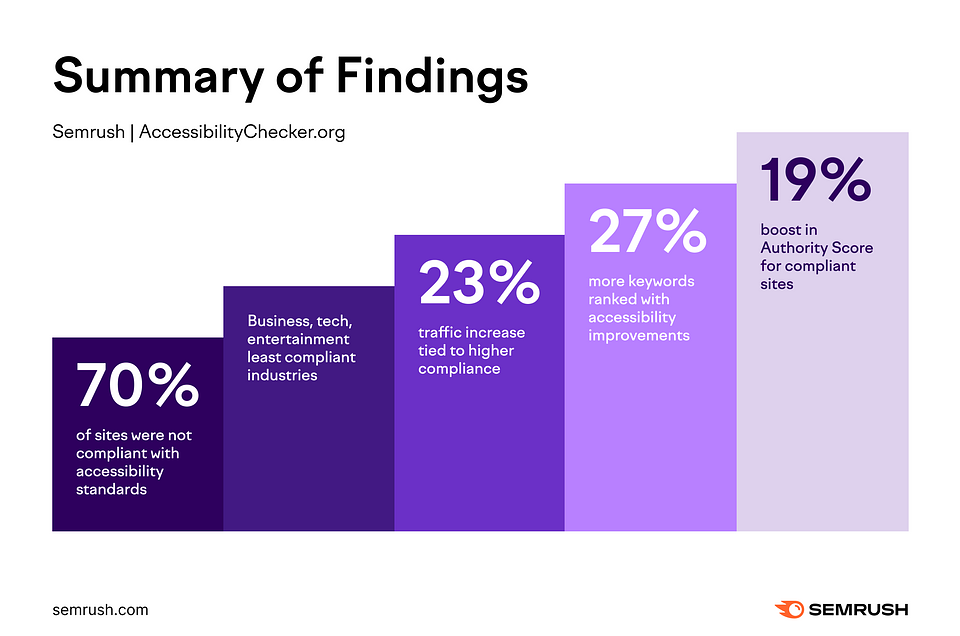
A 2025 Semrush study of 10,000 websites found that more accessible sites ranked for 27% more organic keywords and saw a 23% lift in organic traffic, while over 70% of the sites studied still failed to meet basic accessibility standards. This is an opportunity for your business as most of your competitors have not fixed this yet. The same structure that helps a screen reader also helps AI tools like ChatGPT or Google's AI Overviews read and cite your site correctly.
What Compliance Involves
The legal standard is WCAG 2.0 Level AA, but in plain terms, it comes down to making sure your website works properly for someone who cannot see a screen, use a mouse, or take in information the way most visitors do.
For a website, that means:
-
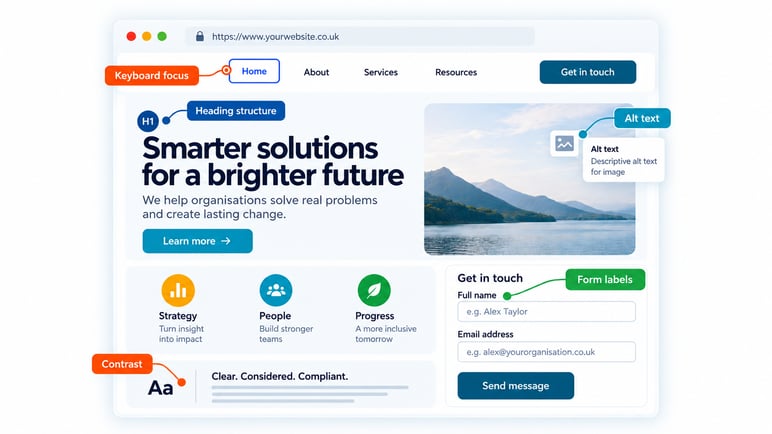
Images that make sense to a screen reader. An informative photo needs a description (alt text), while a purely decorative one should be silent rather than get read aloud as noise.
-
Full keyboard access. Every part of the site, menus, buttons, forms, needs to work by keyboard alone, for anyone who cannot or does not use a mouse.
-
Readable contrast. Text needs enough contrast against its background to be legible for someone with low vision.
-
Logical heading structure. Headings need to follow a sensible order, rather than being picked for how big or bold they look.
-
Clear forms. Labels and error messages need to be specific enough that a visitor knows exactly what is being asked of them, and what has gone wrong.
None of this requires rebuilding your website from scratch. It requires knowing where the gaps are on the site you already have, and fixing them properly.
Thinking of running a free checker first? Read why a score cannot tell you whether you comply.
How Innovation Visual Solves This for You
We pair automated scanning with hands-on manual testing, using NVDA, one of the most widely used screen readers, so we can experience your site the way a visually or motor-impaired visitor would. Automated tools alone are a useful starting point, but they miss problems just as often as they flag things that were never broken.
From there, our approach typically covers a few clear stages:
-
Scan the site to understand where the issues actually are
-
Propose a plan for fixing them
-
Implement the fixes, in the code and in the content
-
Present what has changed and why
-
Train your team so new content stays compliant
-
Review performance after the fact